Maintenance
Managing maintenance requests and repairs
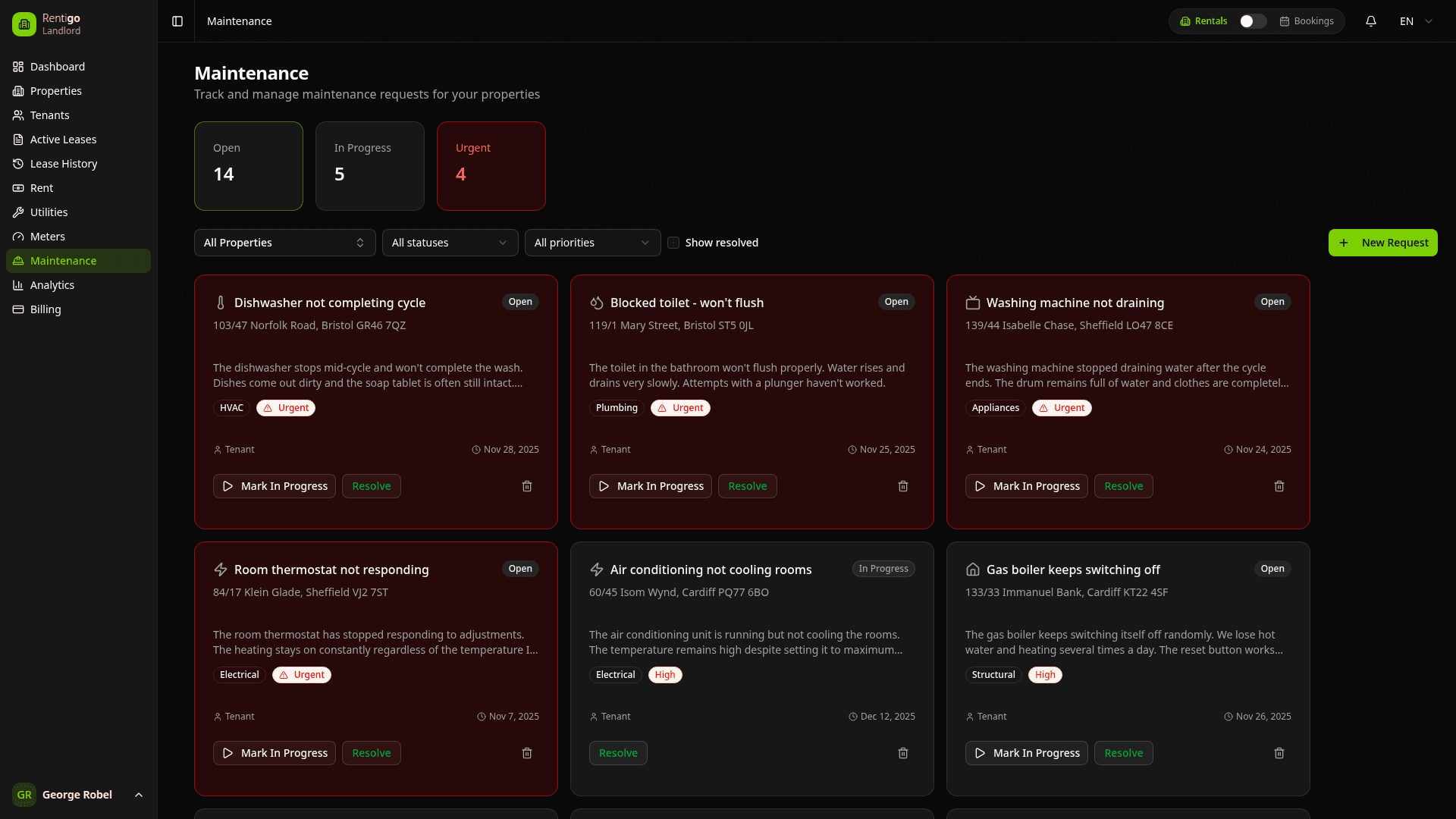
Maintenance tracking helps you manage repair requests, schedule work, and keep your properties in good condition. Tenants can submit requests with photos through their portal, and Rigo can help answer common maintenance questions.
Maintenance Features
Rentigo's maintenance system provides:
- Tenant Submissions — Tenants submit requests with photos from their portal
- Status Tracking — Track progress from report to completion
- Priority Levels — Identify urgent vs. routine work
- Cost Tracking — Record expenses for each repair
- Communication — Keep tenants informed of progress
- Photo Documentation — Before and after images
- History — Complete record of all maintenance work
Request Sources
Maintenance requests can come from:
| Source | Description |
|---|---|
| Tenant | Submitted through tenant portal with description and photos |
| Landlord | Created by you during property inspection |
| AI Detection | Suggested from meter anomalies (e.g., water leak) |
| Equipment | Generated from equipment service schedules (Pro) |
Request Status
| Status | Description |
|---|---|
| Open | New request, not yet addressed |
| In Progress | Work has begun |
| Pending | Waiting on parts, contractor, or approval |
| Completed | Work finished |
| Cancelled | Request cancelled |
Priority Levels
| Priority | Description | Response Time |
|---|---|---|
| Emergency | Health/safety issues, major systems | Immediate |
| High | Major inconvenience, risk of damage | Within 24 hours |
| Normal | Standard repairs | Within a week |
| Low | Minor issues, cosmetic | As scheduled |
Emergency requests (water leaks, no heat, security issues) should be addressed immediately. Don't rely solely on the app for urgent communication — call the tenant directly.
Dashboard Overview
The maintenance dashboard shows:
- Open Requests — Items needing attention
- In Progress — Work currently underway
- Pending — Waiting for parts or contractors
- Recently Completed — Finished in the past 30 days
- By Property — Filter by specific properties
- By Priority — Focus on urgent items first
Quick Actions
From the maintenance list, you can:
- View Details — See complete request information and photos
- Update Status — Change progress status
- Add Notes — Record updates and communication
- Upload Photos — Add documentation images
- Record Costs — Track repair expenses
- Notify Tenant — Send status updates
Tenant Experience
Tenants can interact with maintenance through their portal:
- Submit Requests — Describe issues with photos
- Track Progress — See current status of their requests
- View History — Past maintenance for their unit
- Receive Updates — Get notified when status changes
- Ask Rigo — Get answers to common questions like "When will my faucet be fixed?"
Rigo can answer tenant questions about their maintenance requests, reducing the number of follow-up calls you receive.
Equipment Integration
ProFor Pro users, maintenance integrates with Equipment tracking:
- Scheduled Service — Automatic requests for routine maintenance
- Warranty Tracking — Know when appliances are covered
- Service History — Complete record per appliance
- Vendor Contacts — Quick access to manufacturer support
See Equipment for details.
Next Steps
- Requests — Creating and managing requests
- Tenant Access — How tenants submit requests
- Equipment — Track appliances and service schedules (Pro)