Getting Started with Rentigo
Learn the basics of setting up and using Rentigo for property management
Welcome to Rentigo! This guide will help you get started with managing your rental properties efficiently.
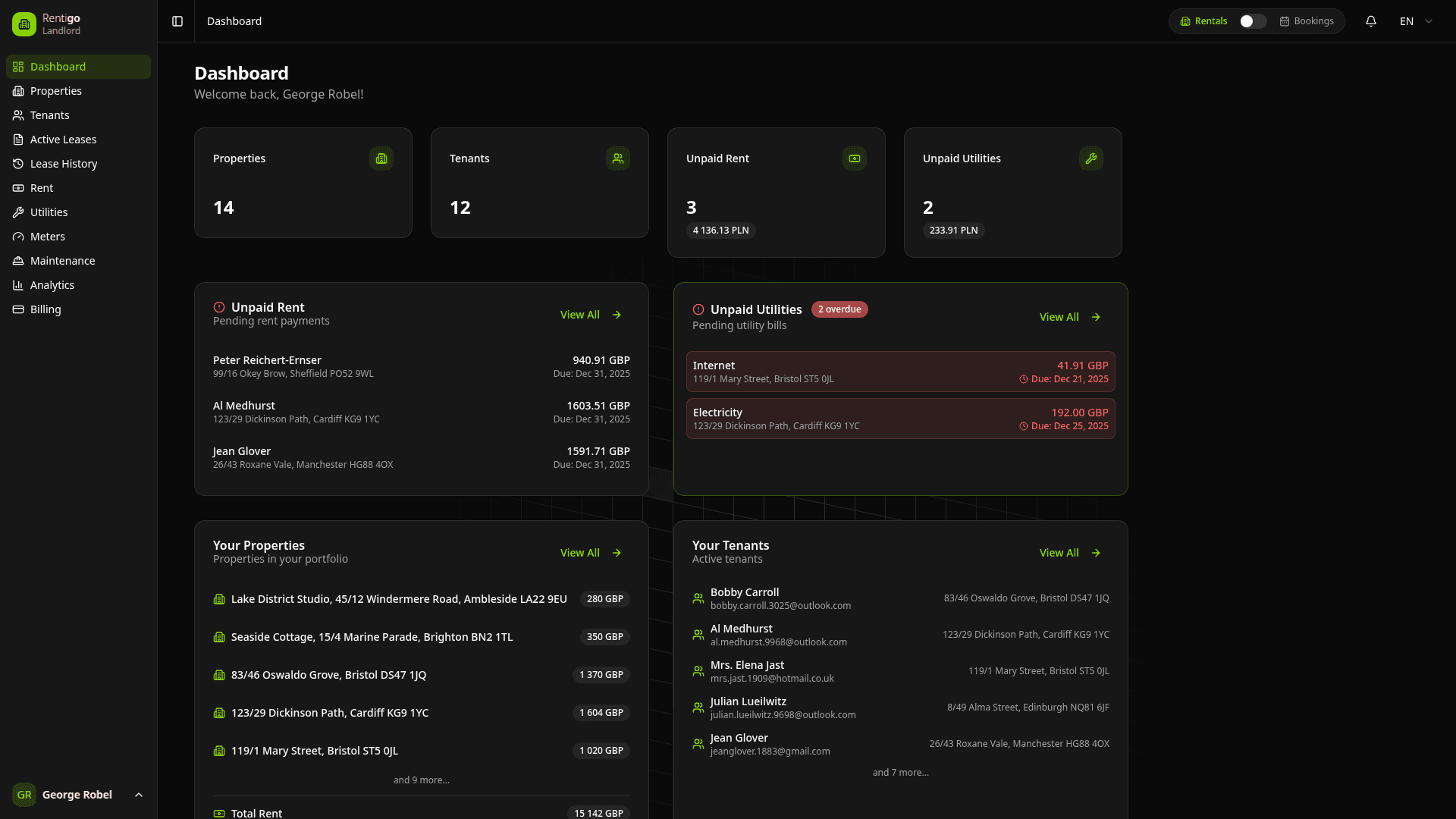
What is Rentigo?
Rentigo is a comprehensive property management platform designed for landlords and property managers. Whether you manage long-term rentals or short-term vacation properties, Rentigo streamlines your workflow:
- Manage Properties — Track all your rental units in one place with detailed records.
- Handle Tenants & Guests — Onboard long-term tenants or manage short-term booking guests.
- Track Payments — Monitor rent collection, utility billing, and online payments.
- Meter Readings — Record utility consumption with photo proof and anomaly detection.
- Deposits — Track security deposits with full transaction history.
- Equipment — Maintain service records, warranties, and maintenance schedules.
- AI Assistant — Get instant answers about your portfolio from Rigo, your AI-powered assistant.
Two Rental Modes
Rentigo supports both long-term and short-term rental management:
Long-Term Rentals (LTR)
Traditional tenant relationships with monthly leases, rent tracking, and utility management. Perfect for residential landlords.
Short-Term Rentals (STR)
Vacation and holiday rentals with bookings, guest portals, and channel integrations. Ideal for Airbnb, Booking.com, and VRBO hosts.
You can mix both modes in your portfolio — some properties for long-term tenants, others for short-term guests.
Quick Start Guide
Follow these core steps to get your portfolio running:
Create Your Account
Sign up at rentigo.cloud with your email address. You'll receive a verification email to confirm your account.
Add Your First Property
Navigate to Properties and click Add Property. Enter the address, rent amount, and select which utilities apply.
Choose Your Rental Mode
For Long-Term Rentals: Invite a tenant from the property page. They'll receive an email to create their account, and a lease is automatically generated.
For Short-Term Rentals: Add bookings manually or import them from booking confirmations. Guests receive a portal link with check-in instructions.
Start Managing
Track rent payments, record meter readings, manage maintenance requests, and use the AI assistant to get quick answers about your portfolio.
Key Features Overview
| Feature | Free | Pro | Business |
|---|---|---|---|
| Properties | 1 | 5 | Unlimited |
| Tenants & Guests | Unlimited | Unlimited | Unlimited |
| Rent & Utility Tracking | Basic | Full | Full |
| Meter Readings | — | Full | Full |
| Equipment Tracking | — | Full | Full |
| Deposit Management | — | Full | Full |
| Online Payments | — | Full | Full |
| AI Assistant (Rigo) | — | Full | Full |
| WhatsApp Integration | — | Full | Full |
| Analytics & Reports | Basic | Full | Full |
Start Free: Explore core features on the Free plan. Upgrade to Pro anytime to unlock advanced automation, payments, and AI tools.
Subscription Tiers
Rentigo offers flexible plans to match your portfolio size:
| Plan | Properties |
|---|---|
| Free | 1 |
| ProPopular | Up to 25 |
| Max | Up to 100 |
| Enterprise | Unlimited |
Next Steps
Ready to build your portfolio? Dive into the details:
- Property Setup — Configure your rental units.
- Tenant Invitations — Onboard long-term tenants.
- Lease Creation — Understand automated lease generation.
- Bookings — Manage short-term rental guests.
Need Help?
If you have questions or run into issues:
- Check the relevant documentation section.
- Ask Rigo, the AI assistant, directly from your dashboard.
- Contact support at support@rentigo.cloud.
- For billing questions, visit the Billing section.