Pro
Liczniki i media
Zaawansowane pomiary mediów i śledzenie zużycia
Pro
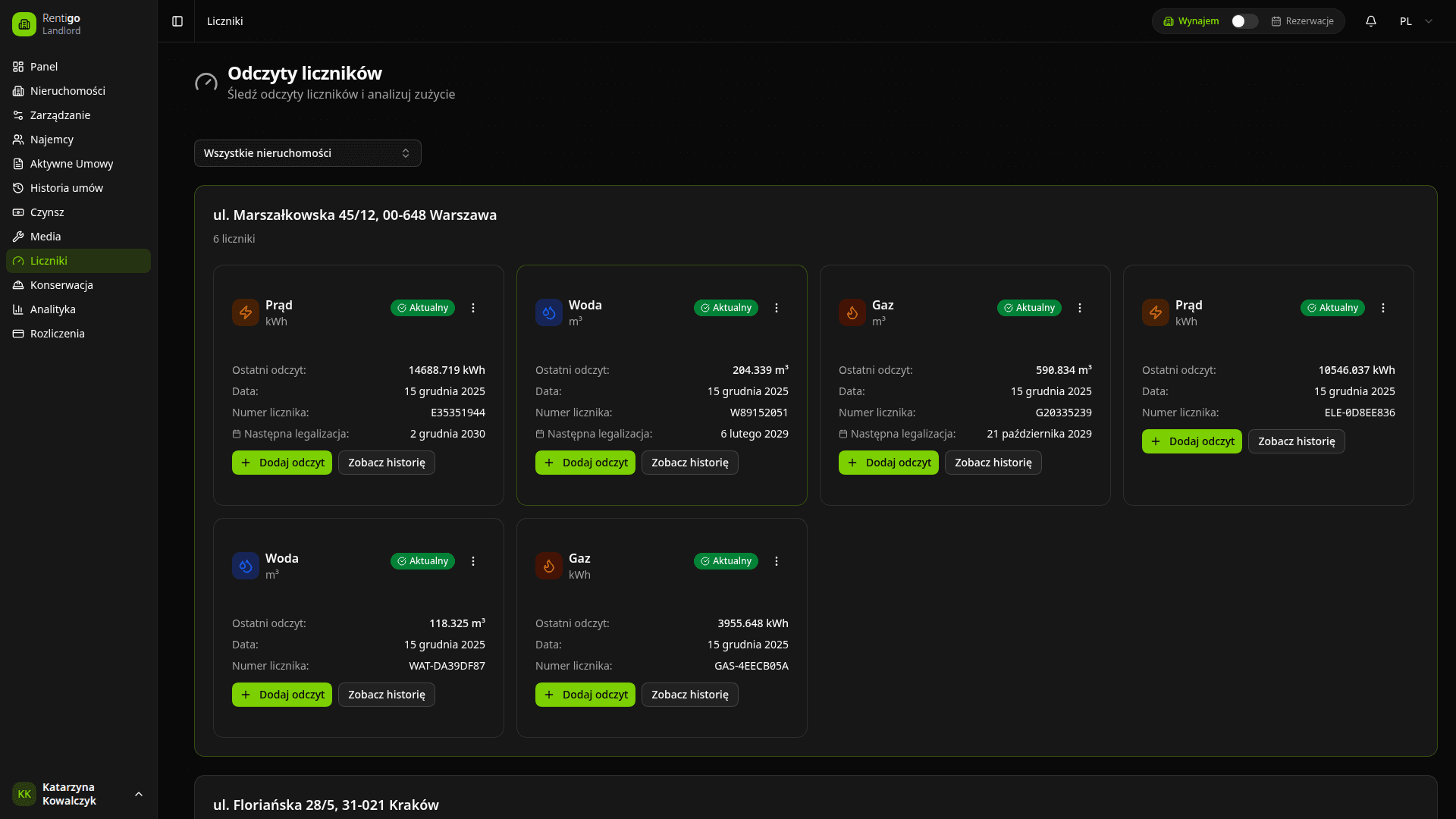
Monitoruj wszystkie liczniki mediów we wszystkich nieruchomościach
Liczniki w Rentigo pozwalają śledzić zużycie mediów w czasie, obliczać koszty na podstawie zużycia i wykrywać nietypowe wzorce, które mogą wskazywać na wycieki lub inne problemy.
Funkcje liczników
Dzięki śledzeniu liczników możesz:
- Rejestrować odczyty - Zapisywać wartości liczników w czasie
- Obliczać zużycie - Automatyczne obliczenia zużycia
- Śledzić koszty - Łączyć zużycie z rachunkami za media
- Wizualizować trendy - Wykresy pokazujące wzorce zużycia
- Wykrywać anomalie - Alerty o nietypowym zużyciu
Obsługiwane typy liczników
| Typ | Jednostka | Typowe użycie |
|---|---|---|
| Elektryczny | kWh | Zużycie prądu |
| Gazowy | m³ lub termie | Zużycie gazu ziemnego |
| Wodny | m³ lub galony | Zużycie wody |
| Ciepłej wody | m³ lub galony | Ciepła woda mierzona oddzielnie |
| Ciepła | GJ lub kWh | Centralne ogrzewanie |
Można dodać własne typy liczników dla dowolnego mierzalnego medium ze spójnymi jednostkami.
Jak działają liczniki
- Utwórz licznik - Połącz go z nieruchomością i typem medium
- Rejestruj odczyty - Wprowadzaj wartość licznika okresowo
- Przeglądaj zużycie - Rentigo oblicza zużycie między odczytami
- Twórz rachunki - Generuj rachunki za media na podstawie zużycia
- Analizuj trendy - Przeglądaj historyczne wzorce zużycia
Widok pulpitu
Pulpit liczników pokazuje:
- Wszystkie liczniki we wszystkich nieruchomościach
- Ostatni odczyt dla każdego licznika
- Zużycie od ostatniego odczytu
- Aktywne alerty o anomaliach
- Szybkie akcje dla typowych zadań
Szybkie akcje
Z listy liczników możesz:
- Dodaj odczyt - Zapisz nową wartość licznika
- Zobacz historię - Przeglądaj wszystkie odczyty i zużycie
- Zobacz analitykę - Wykresy i analiza trendów
- Edytuj licznik - Zaktualizuj ustawienia licznika
Następne kroki
- Typy liczników - Konfiguruj różne typy liczników
- Odczyty - Rejestrowanie i zarządzanie odczytami
- Wykrywanie anomalii - Ustaw alerty zużycia