Czynsz i płatności
Zarządzanie pobieraniem czynszu i płatnościami w Rentigo
Rentigo pomaga śledzić płatności czynszu i rachunki za media, dając pełny obraz dochodów z wynajmu i historii płatności najemców.
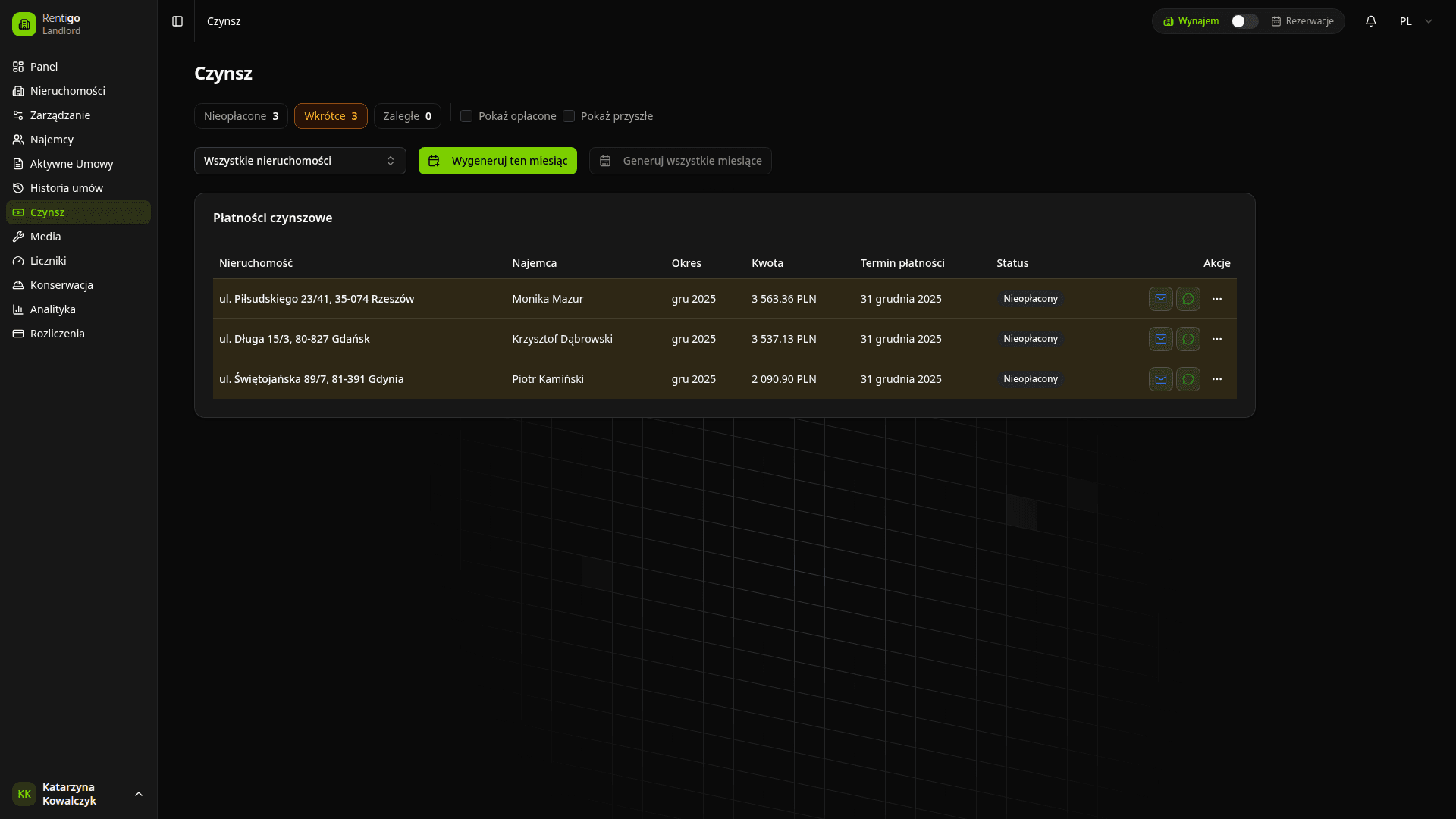
Funkcje płatności
Rentigo zapewnia kompleksowe zarządzanie płatnościami:
- Śledzenie czynszu - Monitoruj miesięczne płatności czynszu dla wszystkich nieruchomości
- Status płatności - Zobacz, co jest zapłacone, należne i zaległe
- Historia płatności - Kompletny rejestr wszystkich transakcji
- Rachunki za media - Śledź opłaty za media oddzielnie od czynszu
- Raporty - Generuj podsumowania płatności i raporty
Typy płatności
| Typ | Opis |
|---|---|
| Czynsz | Miesięczne płatności najmu |
| Kaucja | Kaucje zabezpieczające |
| Media | Rachunki za gaz, prąd, wodę itp. |
| Opłata | Kary za opóźnienia, opłaty serwisowe itp. |
Status płatności
Płatności są automatycznie kategoryzowane:
| Status | Opis |
|---|---|
| Opłacone | Płatność otrzymana i potwierdzona |
| Należne | Płatność oczekiwana, ale jeszcze nie otrzymana |
| Wkrótce należne | Płatność należna w ciągu 7 dni |
| Zaległe | Po terminie, jeszcze nie zapłacone |
| Częściowe | Otrzymano częściową płatność |
Statusy płatności aktualizują się automatycznie na podstawie terminów i zapisanych płatności.
Przegląd pulpitu
Pulpit płatności pokazuje:
- Podsumowanie miesięczne - Oczekiwane vs. otrzymane
- Zaległe kwoty - Co jest jeszcze należne
- Ostatnie płatności - Najnowsze transakcje
- Trendy płatności - Historyczne wskaźniki poboru
Szybkie akcje
Ze strony płatności możesz:
- Zapisz płatność - Oznacz płatność jako otrzymaną
- Wyślij przypomnienie - Wyślij email do najemcy o nadchodzących lub zaległych płatnościach
- Eksportuj dane - Pobierz rekordy płatności
- Wygeneruj fakturę - Utwórz faktury dla najemców
Następne kroki
- Śledzenie czynszu - Szczegółowe zarządzanie czynszem
- Płatności cykliczne - Ustaw automatyczne rozliczenia (Pro)
- Dostawcy płatności - Integracja płatności online (Pro)