Anomaly Detection
Automatic alerts for unusual utility consumption
Anomaly detection monitors your meter readings and alerts you to unusual consumption patterns that might indicate leaks, malfunctions, or other issues.
How It Works
Rentigo analyzes your meter readings to establish normal consumption patterns:
- Learning period - Collects data over several months
- Baseline calculation - Determines typical consumption range
- Continuous monitoring - Compares new readings to baseline
- Alert generation - Notifies you when readings are unusual
Detection Methods
Statistical Analysis
Readings are compared to historical averages:
- Mean consumption - Average daily or monthly usage
- Standard deviation - Normal variation range
- Threshold - How many standard deviations trigger an alert
By default, consumption more than 2 standard deviations from the mean triggers an alert.
Seasonal Adjustment
Consumption patterns change with seasons:
- Heating - Higher in winter
- Cooling - Higher in summer (if AC is metered)
- Water - May vary with garden watering seasons
Rentigo adjusts baselines seasonally for more accurate detection.
Alert Types
| Alert | Description | Typical Cause |
|---|---|---|
| High Consumption | Usage significantly above normal | Leaks, appliance issues |
| Low Consumption | Usage significantly below normal | Vacancy, meter issues |
| Sudden Spike | Sharp increase from previous reading | Major leak, burst pipe |
| Gradual Increase | Steady rise over time | Developing leak, inefficiency |
Configuring Alerts
Navigate to Meter
Go to the meter you want to configure.
Open Settings
Click Settings or the gear icon.
Configure Thresholds
Set alert sensitivity:
- Sensitivity - Low, Medium, or High
- Minimum data - Readings needed before alerting
- Alert recipients - Who receives notifications
Save
Click Save to enable detection.
Sensitivity Levels
| Level | Triggers At | Best For |
|---|---|---|
| Low | 3+ std dev | Reducing false positives |
| Medium | 2+ std dev | Balanced detection (default) |
| High | 1.5+ std dev | Early warning, more alerts |
Receiving Alerts
When an anomaly is detected:
- Dashboard notification - Alert appears on your dashboard
- Email notification - Details sent to your email
- Meter flag - The meter is marked with an alert indicator
Alert Details
Each alert includes:
- Which meter triggered it
- Current consumption vs. expected
- How unusual the reading is (deviation)
- Historical context for comparison
- Suggested actions
Responding to Alerts
Review the Alert
Check the consumption data and compare to recent history.
Verify Reading
Confirm the meter reading is accurate (not a typo or estimation error).
Investigate
If the reading is correct, investigate potential causes:
- Physical inspection for leaks
- Check with tenant about unusual usage
- Review appliance or system changes
Take Action
Address the issue or dismiss the alert if it's a false positive.
Document
Add notes to the meter about what you found and any actions taken.
Common Causes
Water Anomalies
- Toilet leaks (running continuously)
- Pipe leaks or bursts
- Garden hose left running
- Increased occupancy
- Malfunctioning appliances
Electric Anomalies
- HVAC issues
- Space heater usage
- Appliance malfunction
- Holiday lighting
- Electric vehicle charging
Gas Anomalies
- Heating system inefficiency
- Gas leak (urgent!)
- Pilot light issues
- Increased cooking/heating use
Gas anomalies should be investigated immediately. If you suspect a gas leak, contact your utility provider and emergency services.
Dismissing False Positives
Sometimes alerts are triggered by legitimate changes:
- New tenant with different usage patterns
- Seasonal activities (pool filling, holiday guests)
- Known temporary changes
To dismiss:
- Open the alert
- Click Dismiss
- Select a reason
- Add notes if needed
Dismissed alerts help Rentigo improve future detection accuracy.
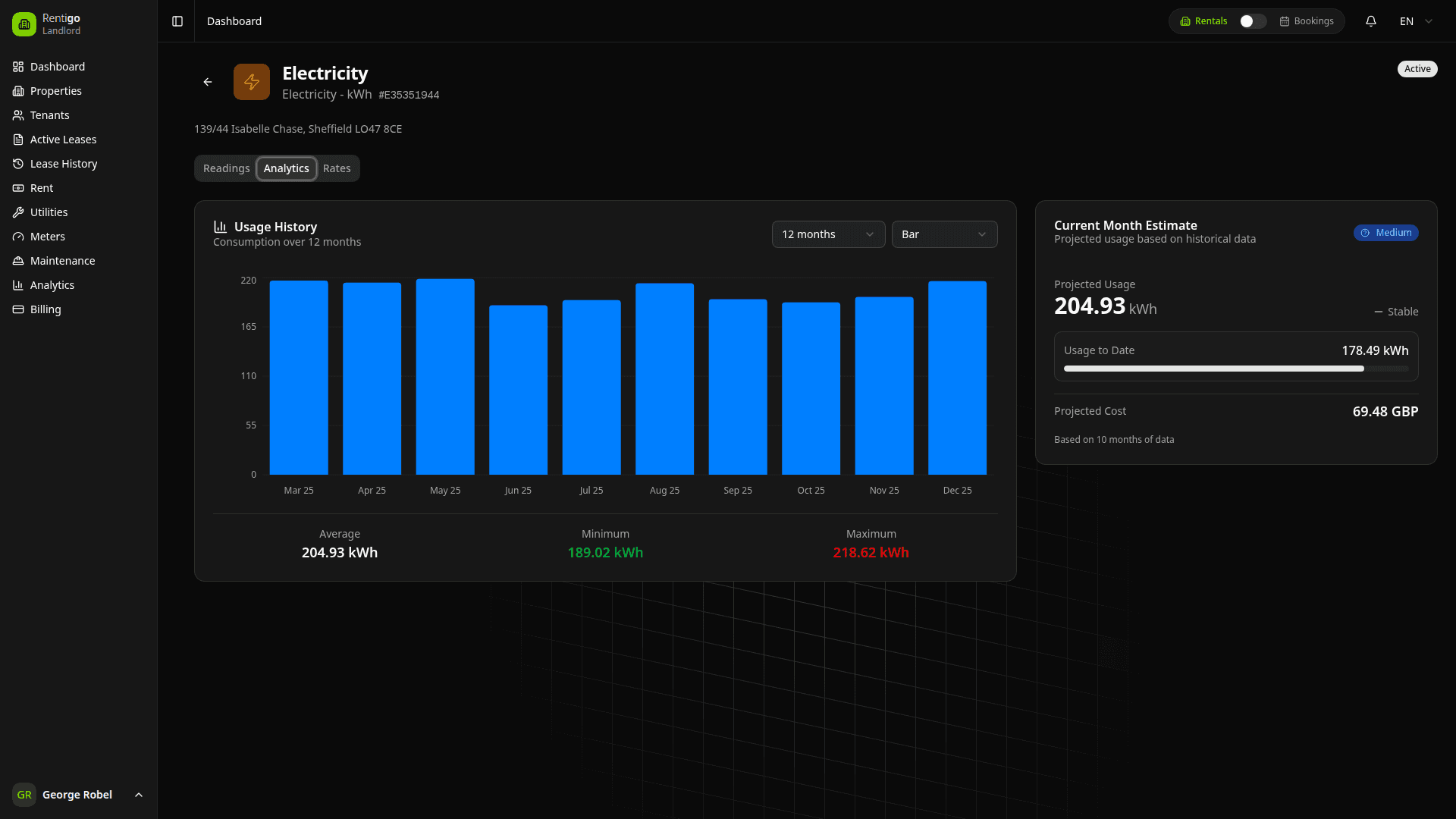
Analytics Dashboard
The analytics view provides:
- Consumption charts - Visualize usage over time
- Trend lines - See patterns and seasonality
- Comparison - Compare to similar properties or periods
- Predictions - Forecast future consumption
Using Analytics
- Go to the meter detail page
- Click the Analytics tab
- Select date range and chart type
- Analyze trends and patterns
Best Practices
- Record readings consistently - More data improves detection
- Act on alerts quickly - Early intervention prevents damage
- Document findings - Notes help with future analysis
- Review periodically - Check even when there are no alerts
- Adjust sensitivity - Tune based on your experience
Next Steps
- Readings - Recording meter data
- Utility Types - Managing utilities