Rent & Payments
Managing rent collection and payments in Rentigo
Rentigo helps you track rent payments and utility bills, giving you a complete picture of your rental income and tenant payment history.
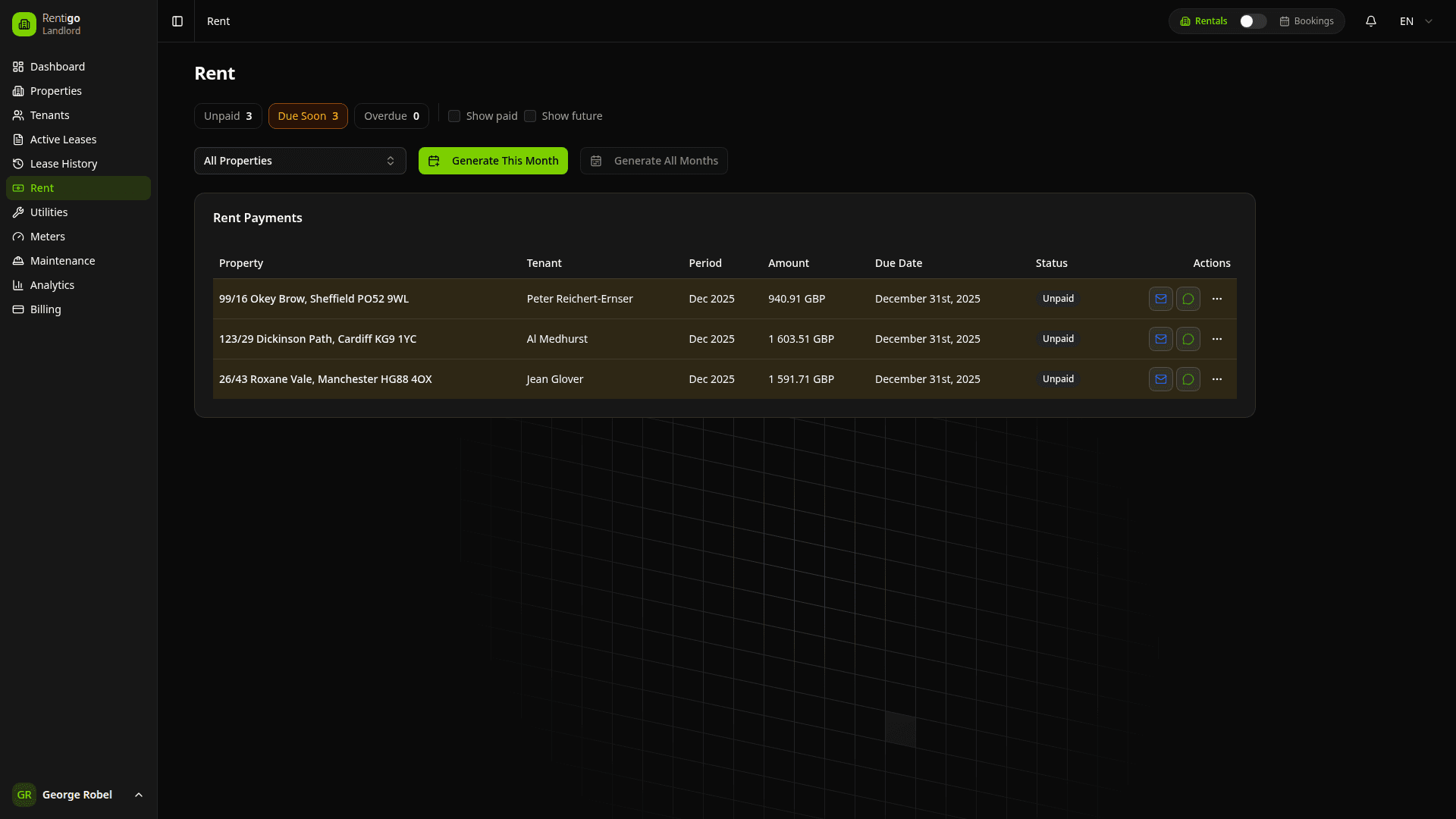
Payment Features
Rentigo provides comprehensive payment management:
- Automatic Rent Generation — Monthly rent records created from active leases
- Payment Tracking — Monitor what's paid, due, and overdue
- Online Payments — Accept payments via Stripe or Tpay (Poland)
- Recurring Payments — Automatic charging on due dates (Pro)
- Tenant Portal — Tenants see their payment status and history
- Payment History — Complete record of all transactions
- Reports — Generate payment summaries and export data
Rent records are automatically created when leases are activated. You don't need to manually create payment entries.
Payment Types
| Type | Description |
|---|---|
| Rent | Monthly rental payments from leases |
| Deposit | Security deposits (see Deposits) |
| Utility | Bills for gas, electricity, water, etc. |
| Fee | Late fees, service charges, etc. |
Payment Status
Payments are automatically categorized:
| Status | Description |
|---|---|
| Paid | Payment received and confirmed |
| Due | Payment expected but not yet received |
| Due Soon | Payment due within the next 7 days |
| Overdue | Past due date, not yet paid |
| Partial | Partial payment received, balance remaining |
Payment statuses update automatically based on due dates. Overdue payments are highlighted in your dashboard.
Dashboard Overview
The payments dashboard shows:
- Monthly Summary — Total expected vs. received for the current month
- Outstanding Amounts — All unpaid rent across properties
- Recent Payments — Latest recorded transactions
- Collection Rate — Percentage of rent collected on time
- Trends — Historical payment patterns
Quick Actions
From the payments page, you can:
- Record Payment — Mark a payment as received
- Send Reminder — Email a tenant about upcoming or overdue payments
- Enable Recurring — Set up automatic payments (Pro)
- Export Data — Download payment records as CSV
- Filter & Search — Find specific payments by property, tenant, or date
Tenant Payment Portal
Tenants can view their payments in their portal:
- Current rent due and amount
- Payment history for all their properties
- Option to pay online (if configured)
- Ability to set up recurring payments (Pro)
Tenants can also ask Rigo, the AI assistant, questions about their payment status, due dates, and history.
Online Payments
ProAccept online payments from tenants:
| Provider | Regions | Payment Methods |
|---|---|---|
| Stripe | Global | Cards, ACH, SEPA |
| Tpay | Poland | Cards, BLIK, bank transfers |
When online payments are enabled:
- Tenants receive a payment link when rent is due
- They can pay instantly from their portal
- Payment is automatically recorded in Rentigo
- You receive a notification and payout
See Payment Providers for setup instructions.
Currency Support
Rentigo supports multiple currencies:
| Currency | Common Use |
|---|---|
| PLN | Poland |
| EUR | Spain, Germany, other EU |
Each property is set to a specific currency. All payments for that property use the same currency.
Next Steps
- Rent Tracking — Detailed rent management
- Recurring Payments — Set up automatic billing (Pro)
- Payment Providers — Connect Stripe or Tpay (Pro)
- Deposits — Managing security deposits